 InfraInk
Try and Hit Enter to Search
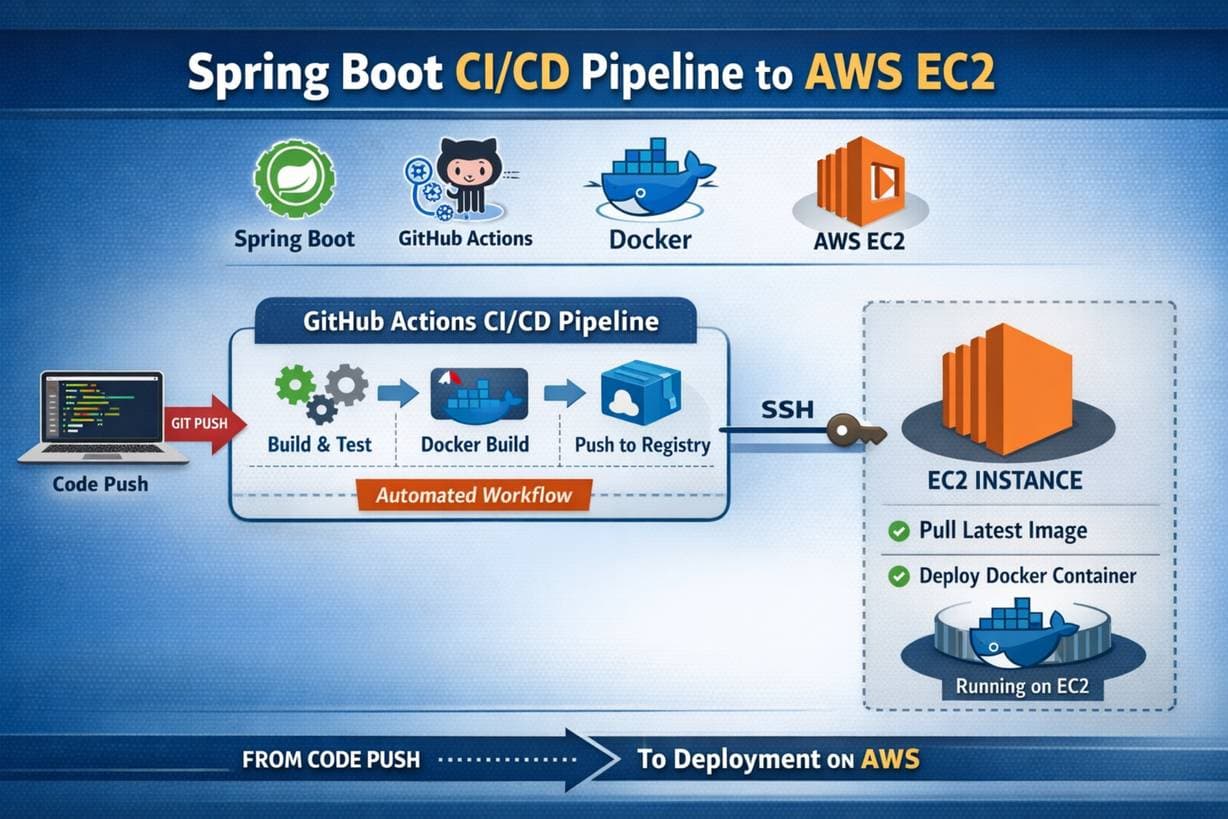
Building an application is only half the journey. Deploying it reliably and automating the process turns a project into a **production-ready system**. We recently deployed our **Spring Boot backend** on an **AWS EC2 instance** and set up a **CI/CD pipeline using GitHub Actions and Docker**. In this post, I'll walk through the **architecture, flow, and key concepts** behind our deployment pipeline.
We recently deployed our Spring Boot backend on an AWS EC2 instance and set up a CI/CD pipeline using GitHub Actions and Docker. In this post, I'll walk through the architecture, flow, and key concepts behind our deployment pipeline.
Before CI/CD:
After CI/CD:
Git Push
   ↓
GitHub Actions (CI/CD)
   ↓
Build Spring Boot App
   ↓
Create Docker Image
   ↓
Push Image to Docker Hub
   ↓
SSH into EC2
   ↓
Pull Latest Image
   ↓
Run Docker Container
spring-boot-app/
├── src/
├── target/
├── Dockerfile
├── .dockerignore
├── .env
├── pom.xml
Create a Dockerfile in your project root:
FROM openjdk:17-jdk-slim

WORKDIR /app

COPY target/*.jar app.jar

EXPOSE 8080

ENTRYPOINT ["java", "-jar", "app.jar"]
This Dockerfile:
8080Create a .env file (do NOT push this to GitHub):
SPRING_DATASOURCE_URL=jdbc:mysql://localhost:3306/db
SPRING_DATASOURCE_USERNAME=root
SPRING_DATASOURCE_PASSWORD=password
JWT_SECRET=your-secret-key
In application.properties:
spring.config.import=optional:file:.env[.properties]
t2.micro (free tier)22 (SSH)8080 (Spring Boot)ssh -i key.pem ubuntu@<EC2_PUBLIC_IP>
sudo apt update
sudo apt install docker.io -y
sudo systemctl start docker
sudo systemctl enable docker
sudo usermod -aG docker ubuntu
Log out and log back in for Docker permissions to take effect.
username/spring-backend)Log in from EC2 if needed:
docker login
.github/workflows/deploy.yml
Add these in GitHub → Settings → Secrets → Actions:
DOCKER_USERNAMEDOCKER_PASSWORDEC2_HOSTEC2_USEREC2_SSH_KEYdeploy.yml)name: Spring Boot CI/CD
on:
push:
branches:
- main
jobs:
deploy:
runs-on: ubuntu-latest
steps:
- name: Checkout Code
uses: actions/checkout@v3
- name: Set up JDK
uses: actions/setup-java@v3
with:
java-version: '17'
- name: Build with Maven
run: mvn clean package -DskipTests
- name: Docker Login
run: echo "${{ secrets.DOCKER_PASSWORD }}" | docker login -u "${{ secrets.DOCKER_USERNAME }}" --password-stdin
- name: Build Docker Image
run: docker build -t ${{ secrets.DOCKER_USERNAME }}/spring-backend:latest .
- name: Push Docker Image
run: docker push ${{ secrets.DOCKER_USERNAME }}/spring-backend:latest
- name: Deploy to EC2
run: |
echo "${{ secrets.EC2_SSH_KEY }}" > key.pem
chmod 600 key.pem
ssh -o StrictHostKeyChecking=no -i key.pem ${{ secrets.EC2_USER }}@${{ secrets.EC2_HOST }} << EOF
docker pull ${{ secrets.DOCKER_USERNAME }}/spring-backend:latest
docker stop backend || true
docker rm backend || true
docker run -d -p 8080:8080 --env-file .env --name backend ${{ secrets.DOCKER_USERNAME }}/spring-backend:latest
EOF
This ensures zero manual deployment.
git push origin main
Automatically:
docker image prune -f
This prevents disk space issues.
This CI/CD pipeline transformed our Spring Boot backend into a scalable, professional system.
With GitHub Actions, Docker, and AWS EC2, we achieved reliable deployments with minimal effort.
If you're building backend applications, CI/CD isn't optional—it's essential.
Please to comment.

Building an application is only half the journey. Deploying it reliably and automating the process turns a project into a **production-ready system**. We recently deployed our **Spring Boot backend** on an **AWS EC2 instance** and set up a **CI/CD pipeline using GitHub Actions and Docker**. In this post, I'll walk through the **architecture, flow, and key concepts** behind our deployment pipeline.
By Maheswari Chandrani

In a world filled with constant noise and distractions, calmness is more than just a moment of peace—it's a superpower. Discover how embracing calmness can transform your mental well-being, relationships, and productivity.
By Srikar

Vehicles have come a long way from horse-drawn carriages to AI-powered electric cars. Here's how mobility is transforming our world.
By Bhaskar Gandham


120 views